


Let’s be honest modern civil engineering runs on data. From mapping utility lines for a new subdivision to analyzing flood risk for a major highway project, as an engineer is it important to note where things are is just as important as what they are. This is where Geographic Information Systems (GIS) come in. What used to be a niche tool for cartographers is now a cornerstone of our industry.
But with so many options out there, which one is right for your work? There is a number of factors to consider whether you are a large firm needing an all-in-one enterprise solution, or a solo consultant who needs powerful tools without the hefty price tag?
If these questions describe the problem you are dealing with, don’t worry we have got you covered. In this blog article we are going to break down the top GIS tools , looking at what they do best, where they fall short, and what they’ll cost you.
Top GIS Tools for Engineers
1. Esri ArcGIS
If you have worked as civil engineer for a while, you have probably encountered ArcGIS. As the clear market leader, Esri has built a comprehensive ecosystem that includes the powerful desktop application ArcGIS Pro, the collaborative ArcGIS Online, and enterprise-level server solutions. It’s the go-to for complex, large-scale projects. With a robust suite of desktop, online, and enterprise applications, ArcGIS provides everything from basic mapping to advanced spatial analytics and 3D modeling.
Pros:
- The established industry standard.
- Comprehensive tools for any CE task.
- Integrates well with AutoCAD and Python.
- Excellent professional support and training.
Cons:
- Has a steep learning curve.
- Expensive for individuals and small firms.
Pricing:
- ArcGIS for Personal Use: $100/year.
- ArcGIS Pro (Standard License): About $1,500/year per user.
- ArcGIS Online Creator: About $500/year per user.
Best For: Government agencies, engineering firms, and large enterprises requiring complex spatial analysis and high scalability.


2. QGIS (Quantum GIS)
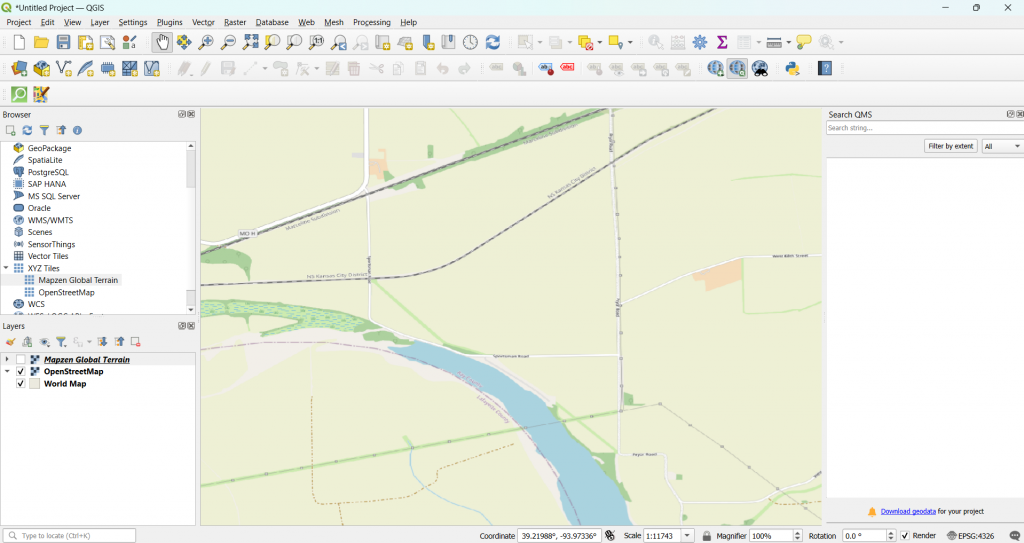
QGIS is a free, open-source GIS platform that has grown incredibly powerful over the years. Driven by a global community of developers and users, it offers a surprisingly robust alternative to commercial software, making it a favorite among consultants, academics, and non-profits. It supports plugins, scripting, and various data formats, making it highly customizable.
Pros:
- Completely free and open-source.
- Highly customizable with a vast plugin library.
- Lightweight and runs on most hardware.
- Supported by a very active community.
Cons:
- The user interface feels less polished.
- Lacks dedicated enterprise-level support.
Pricing:
Free (open source)
Best For: Independent consultants, researchers, and organizations seeking a cost-effective and customizable GIS solution.
3. Google Earth Engine
Google Earth Engine (GEE) isn’t your traditional GIS tool. It’s a cloud-based platform designed for analyzing massive geospatial datasets. It is widely used for remote sensing, land use studies, and environmental monitoring.
Pros:
- Instant access to huge satellite data archives.
- Cloud-based processing handles heavy loads.
- Ideal for monitoring environmental changes.
- Free for research and non-commercial use.
Cons:
- Requires JavaScript or Python coding skills.
- Not designed for map-making or vector editing.
- Primarily focused on raster analysis.
Pricing:
- Free for academic, research, and non-commercial use.
- Commercial pricing available on request.
Best For: Researchers, NGOs, and institutions working with large-scale satellite and environmental data.
4. GRASS GIS
GRASS (Geographic Resources Analysis Support System) is an open-source GIS known for its strong geospatial modeling, terrain analysis, and raster processing capabilities.
Pros:
- Exceptional for advanced raster analysis.
- Powerful for hydrological and terrain modeling.
- Highly scriptable for complex workflows.
- Integrates directly into QGIS.
Cons:
- Very steep learning curve for new users.
- The user interface feels dated.
- Overkill for basic mapping tasks.
Pricing:
Free (open source)
Best For: Academics, researchers, and professionals with specific needs in geospatial modeling or environmental analysis.


Conclusion
Choosing the right GIS tool depends on your specific use case, technical skills, and budget. Here’s a quick comparison to guide your decision:
| Tool | Strength | Pricing | Best For |
|---|---|---|---|
| ArcGIS | Full-featured, enterprise GIS | $100 to $1500/year | Governments, engineering firms |
| QGIS | Free, flexible, powerful | Free | Consultants, academics |
| Google Earth Engine | Remote sensing, cloud analysis | Free / Custom | Researchers, environmental analysts |
| GRASS GIS | Advanced modeling & scripting | Free | Environmental and terrain analysis experts |
Please don’t forget to subscribe to our newsletter!
YOU MAY ALSO LIKE TO READ
- A Simple Guide to Runoff ManagementWhether you are working on a small infrastructure project or a large one, rainwater (runoff) is always going to be an issue. That’s why runoff management is a critical part of sustainable land development and environmental protection. As more parts of the world become urbanized and climate patterns continue to… Read more: A Simple Guide to Runoff Management
- A Billion Dollar Problem: What Construction Waste Management Means for the IndustryIt is estimated that nearly 30% of the world’s solid waste comes from construction and demolition (C&D) activities. This includes everything from broken concrete, wood, metal, drywall, bricks, glass, plastics, asphalt, to packaging materials. Most of this waste ends up in landfills, contributing to environmental degradation and increasing costs for… Read more: A Billion Dollar Problem: What Construction Waste Management Means for the Industry
- 5000 Years of Computing: Our Engineering Journey to Quantum ComputingFor over a millennium, human ingenuity has been entwined with the development of tools to aid computation. From the use of the abacus beads to the barely comprehensible entanglement of quantum bits, computing has evolved not only in speed and complexity but also in the way engineers use it to… Read more: 5000 Years of Computing: Our Engineering Journey to Quantum Computing